.png)
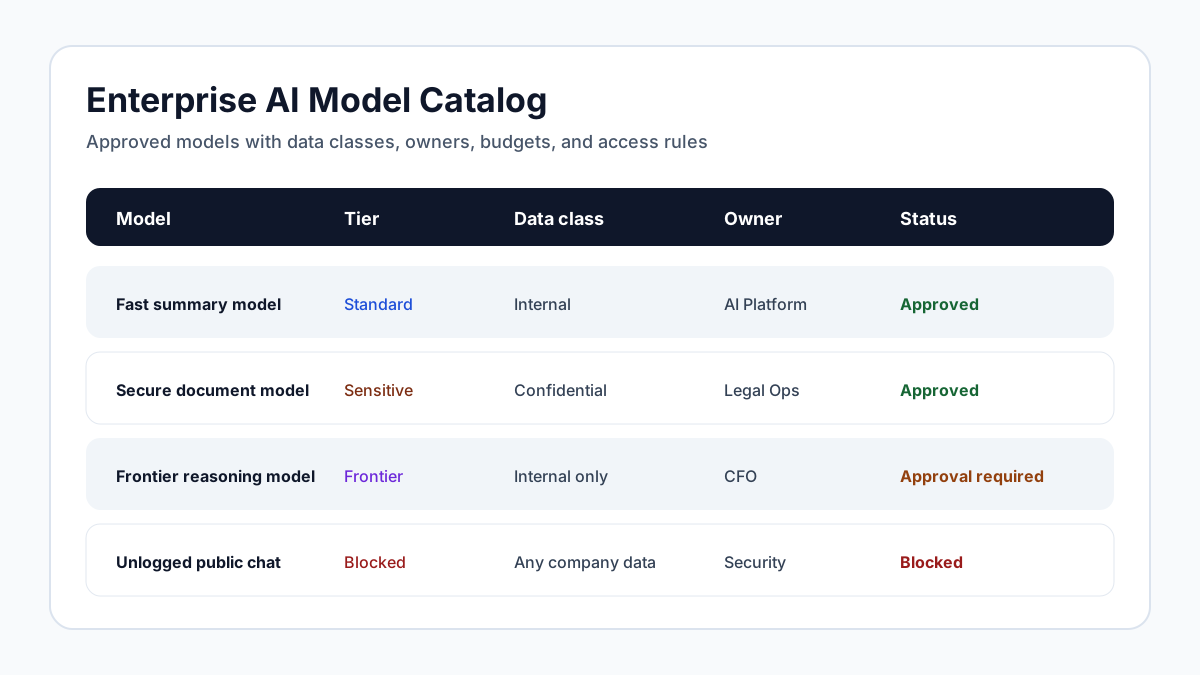
Why Model Choice Needs Governance
Enterprise AI teams are no longer choosing one model for one chatbot. They are managing frontier reasoning models, fast low-cost models, coding models, image models, speech models, embedding models, rerankers, open-source deployments, private models, and vendor-specific copilots. Each model has different cost, context length, data handling terms, latency, modality, accuracy profile, region support, safety behavior, and operational maturity. If every team chooses independently, the organization gets duplicated spend, inconsistent risk, weak auditability, and unpredictable user experience.
A model catalog creates a governed source of truth. It tells employees which models are approved, what each model is good for, which data classes it can process, who can access it, which regions or providers are allowed, what budget rules apply, and when the model needs review. The catalog should not be a static spreadsheet maintained by one AI enthusiast. It should be an operational control connected to identity, routing, budgets, workflows, and audit evidence. Model choice is now a policy decision because it affects security, compliance, performance, and cost at the same time.
Define Model Tiers Employees Can Understand
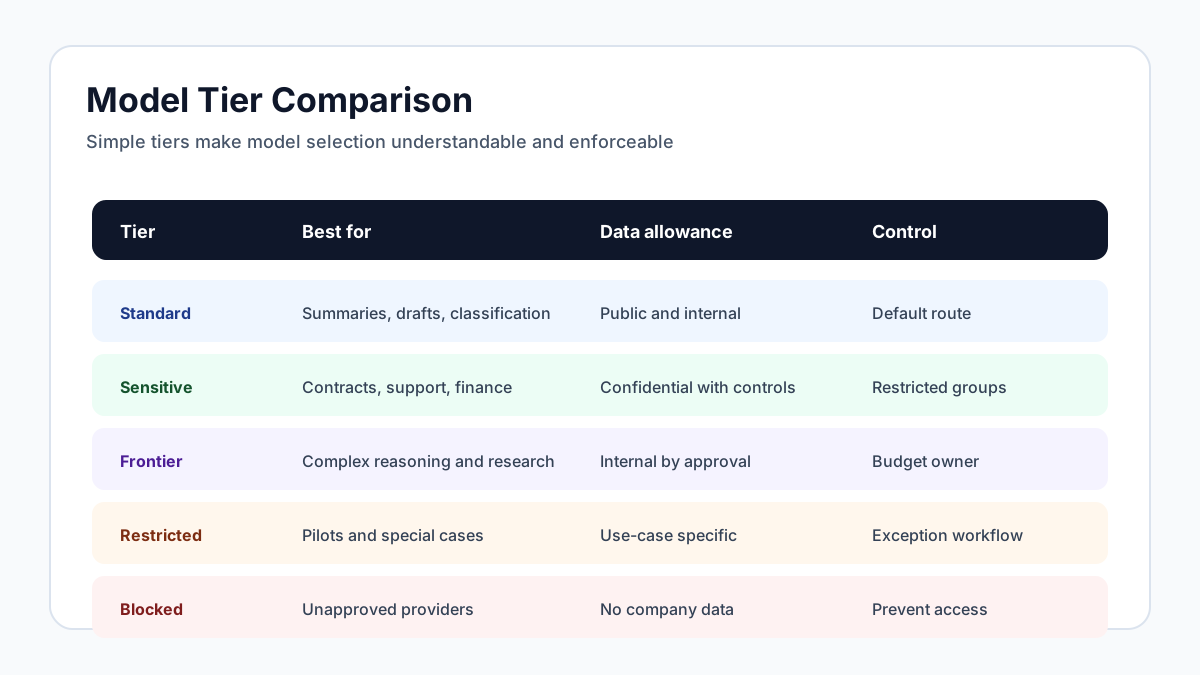
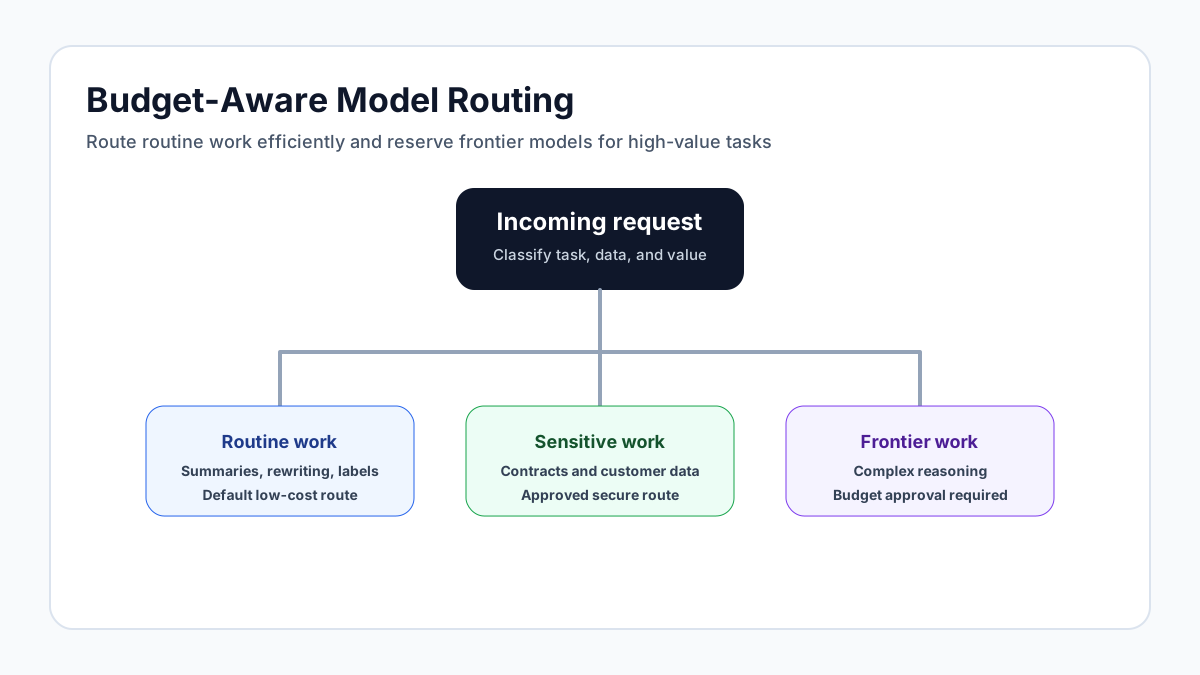
A useful catalog starts with simple tiers. For example, a standard productivity tier might include fast, affordable models approved for general internal work. A sensitive workflow tier might include models or deployments approved for confidential or customer-controlled data. A frontier reasoning tier might be reserved for complex analysis, high-value research, or executive-approved workloads because cost is higher. A restricted tier might include experimental models, multimodal models, or external tools that require special approval. A blocked tier documents models or providers that employees should not use.
The tier names should be business-friendly. Employees do not need to understand every benchmark or provider architecture. They need to know which model to use for summarizing a meeting, drafting a support response, analyzing a confidential spreadsheet, writing code, generating an image, or reviewing a contract. The catalog can still include technical details for developers and governance teams, but the default experience should guide selection. Good model governance reduces choice overload. It does not ask every employee to become a model evaluator.
Record the Right Model Metadata
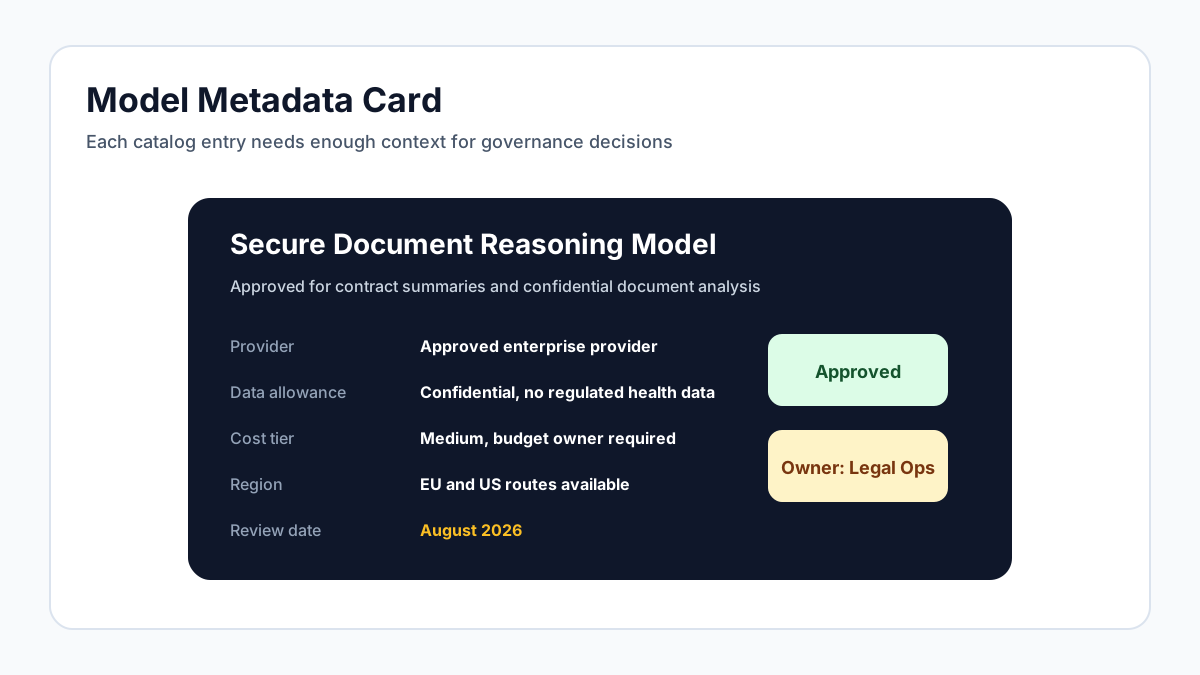
Each catalog entry should include enough metadata to support policy decisions. Basic fields include model name, provider, owner, approval status, model type, modalities, context size, supported regions, deployment type, data retention terms, training use restrictions, cost tier, latency profile, and known limitations. Governance fields include approved data classes, approved departments, prohibited uses, required disclaimers, review date, exception owner, and links to vendor risk evidence.
The catalog should also capture performance and operational notes. A model may be excellent for long-context document analysis but too slow for customer chat. Another may be cheap enough for high-volume summarization but inappropriate for legal reasoning. An open-source model may provide strong residency control but require more internal maintenance. A multimodal model may create new risks around images or audio. These distinctions belong in the catalog because they help route work correctly. Without metadata, teams fall back on popularity, hype, or whatever model appears first in the interface.
Connect the Catalog to Identity and Access
A catalog is only enforceable if it connects to identity. Otherwise it becomes a recommendation page that users can ignore. Model access should be governed by role, department, training status, data class, budget, and workflow. The finance team may need access to a sensitive spreadsheet analysis model. The marketing team may need brand-safe image generation. Engineering may need coding models with repository-specific guardrails. Contractors may need narrower access than employees. Executives may need frontier reasoning for strategy work but still require data protection rules.
Identity integration also supports deprovisioning and change management. When an employee moves departments, access should update automatically. When a contractor engagement ends, model access should end with it. When a model is downgraded or replaced, affected users should be routed to the new approved option. This is where model governance intersects with role-based access. The catalog defines what is allowed. Identity determines who is allowed to use it. Runtime policy enforces the decision.
Budget Model Access Like a Portfolio
Model catalogs are also FinOps tools. AI cost problems often come from using expensive models for routine work. A frontier model may be justified for complex reasoning, legal analysis, or high-impact research, but it is usually wasteful for simple rewriting, formatting, classification, or short summaries. A catalog can steer routine tasks to economical models while reserving expensive tiers for workflows that justify the cost.
Budget rules should be visible in the catalog. Teams should know which models count against their department budget, which workflows have hard limits, and which requests require approval. Cost per request, cost per workflow, monthly spend by model, and forecast variance should feed back into catalog decisions. If one expensive model is used heavily for a task that a cheaper model handles well, the default route should change. If a high-cost model demonstrably improves contract review quality or accelerates incident response, the catalog can preserve access with clearer ownership. Treat models like an investment portfolio: allocate expensive capability where it produces value, and route commodity work efficiently.
Review Models Through Their Lifecycle
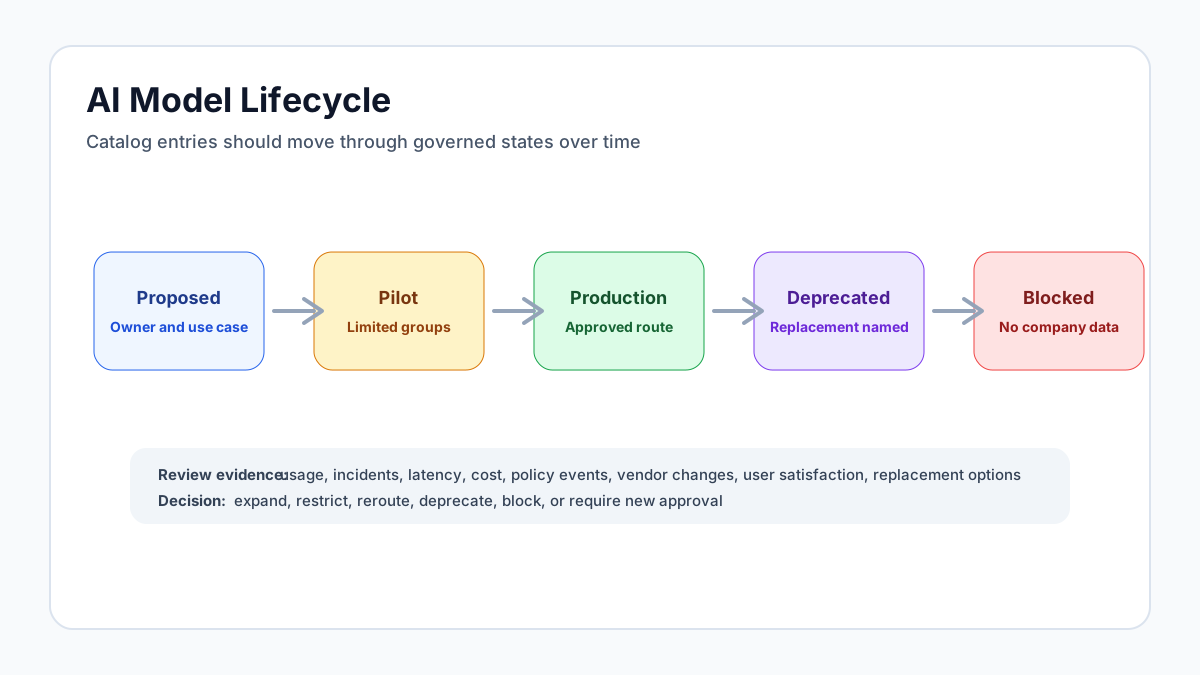
Models should have lifecycle states: proposed, approved for pilot, approved for production, conditionally approved, deprecated, and blocked. This matters because model quality, cost, terms, and risk change over time. A model that was best-in-class six months ago may become too expensive or fall behind safer alternatives. A vendor may change retention terms. A new region may become available. A vulnerability, jailbreak pattern, or compliance concern may require restrictions. A model may perform well in testing but fail in production workflows.
Lifecycle review should use evidence, not hype. Look at usage volume, policy events, incident history, cost, latency, user satisfaction, workflow outcomes, vendor changes, and replacement options. Deprecation should be managed carefully so teams are not stranded. The catalog should name the replacement model, migration deadline, and exception path. Blocked models should remain visible with a short explanation so employees understand the decision. Hidden bans create confusion. Visible governance creates predictability.
Make the Catalog Useful for Developers and Employees
A model catalog has two audiences. Employees need a simple interface that answers "which tool should I use for this work?" Developers need more detailed information: API endpoints, rate limits, context limits, supported file types, latency expectations, streaming behavior, structured output support, tool-calling support, evaluation notes, and fallback routes. If the catalog serves only one audience, the other will create an unofficial version. Employees will share tips in chat channels. Developers will keep model notes in README files or local scripts. Governance then loses consistency.
The catalog should therefore have layered detail. The employee view should group models by task and approved data class: summarize a meeting, analyze a contract, draft a customer response, write code, create an image, search internal knowledge, or run a regulated workflow. The developer view should include technical metadata, SDK examples, routing rules, and owners for exceptions. Both views should point back to the same governance record, so access, risk, and lifecycle state remain consistent. A model catalog is successful when it becomes the easiest path, not another compliance destination users avoid.
The catalog should also make defaults explicit. If a workflow has a recommended model, users should not have to compare five alternatives. If a developer wants to override the default, the catalog should explain the approval path and tradeoffs. Defaults are governance decisions. They determine cost, latency, privacy posture, and output quality for thousands of routine requests. A well-run catalog treats default selection as a reviewable control, not an implementation detail buried in code.
The same principle applies to fallback behavior. If the preferred model is unavailable, the catalog should define whether the workflow retries, routes to a cheaper model, escalates to a private deployment, or fails closed. Silent fallback can create compliance and quality issues because users may believe they used an approved model when the system quietly sent the request elsewhere. Explicit fallback rules make model governance resilient during outages, provider changes, and rapid model releases.
Ownership should be visible too. Every catalog entry needs a business owner and a technical owner. The business owner decides whether the model still fits the use case. The technical owner manages integration, monitoring, and migration. Without named owners, stale model entries accumulate and nobody feels responsible for removing them. Ownership also gives employees a clear place to ask for exceptions, report quality issues, or suggest a better default during rollout and review cycles across teams globally.
Where Remova Fits
Remova provides the control layer that makes a model catalog actionable. Model governance can define approved models, routes, departments, and use cases. Role-based access can enforce who can use each tier. Department budgets can keep frontier model access financially accountable. Policy guardrails can prevent sensitive data from reaching models that are not approved for it. Audit trails can show which model was used and why a request was allowed, blocked, or rerouted.
The value is not just administrative tidiness. A model catalog lets the organization move faster because employees have clear options and governance teams have enforceable controls. Instead of debating every model choice in chat threads and procurement tickets, the company can publish a living catalog, connect it to runtime policy, and review model decisions with evidence.