.png)
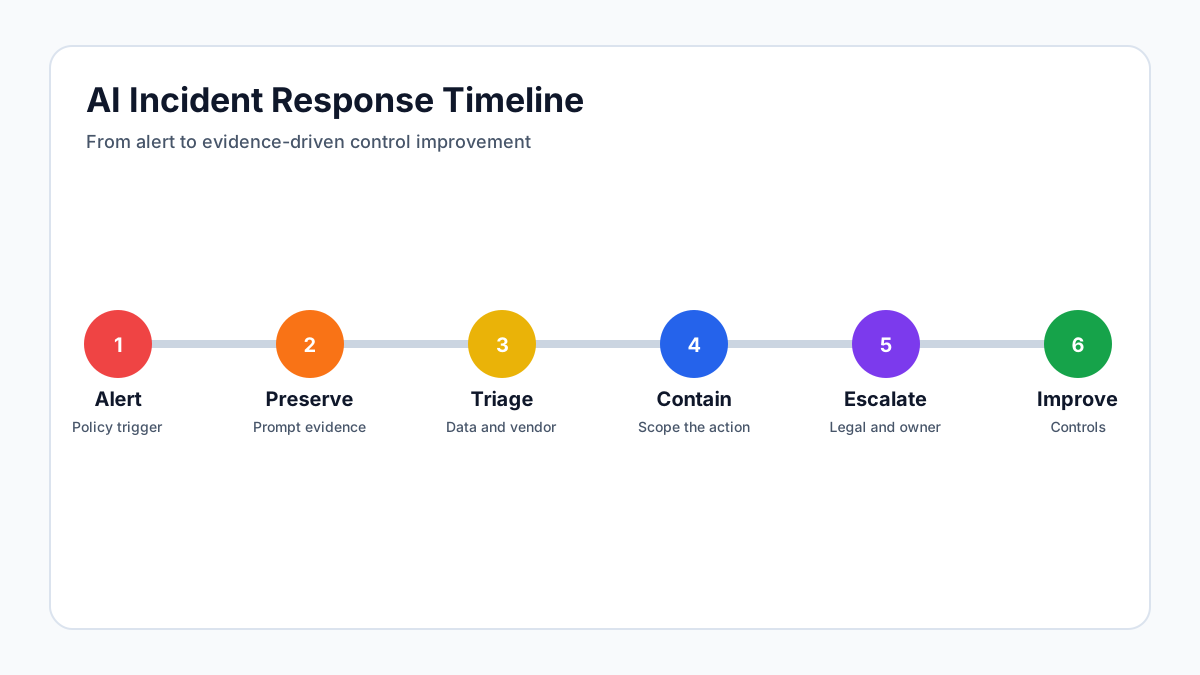
Treat AI Exposure as an Incident Class
Sensitive data exposure through an LLM is not the same as losing a laptop, misconfiguring a storage bucket, or emailing a spreadsheet to the wrong person. The core questions are different. What was included in the prompt, file, image, or tool call? Which model or vendor received it? Was the data retained, logged, reviewed by humans, or used for training? Did the user receive an output that repeated or transformed the sensitive data? Did the output travel into another system such as a ticket, document, chat channel, code repository, or customer email?
Organizations need a named incident class for AI exposure because vague categories create slow response. If the security team calls every event "data leakage," analysts will overreact to harmless prompts and underreact to serious uploads. A prompt containing a public press release is not the same as a prompt containing unreleased financials, source code, authentication secrets, patient data, employee records, or customer support exports. The response plan should classify severity based on data sensitivity, vendor status, retention policy, user intent, model output, and downstream distribution. This gives the incident team a fast way to move from alert to triage without inventing the playbook during the event.
Preserve Evidence Before Changing Anything
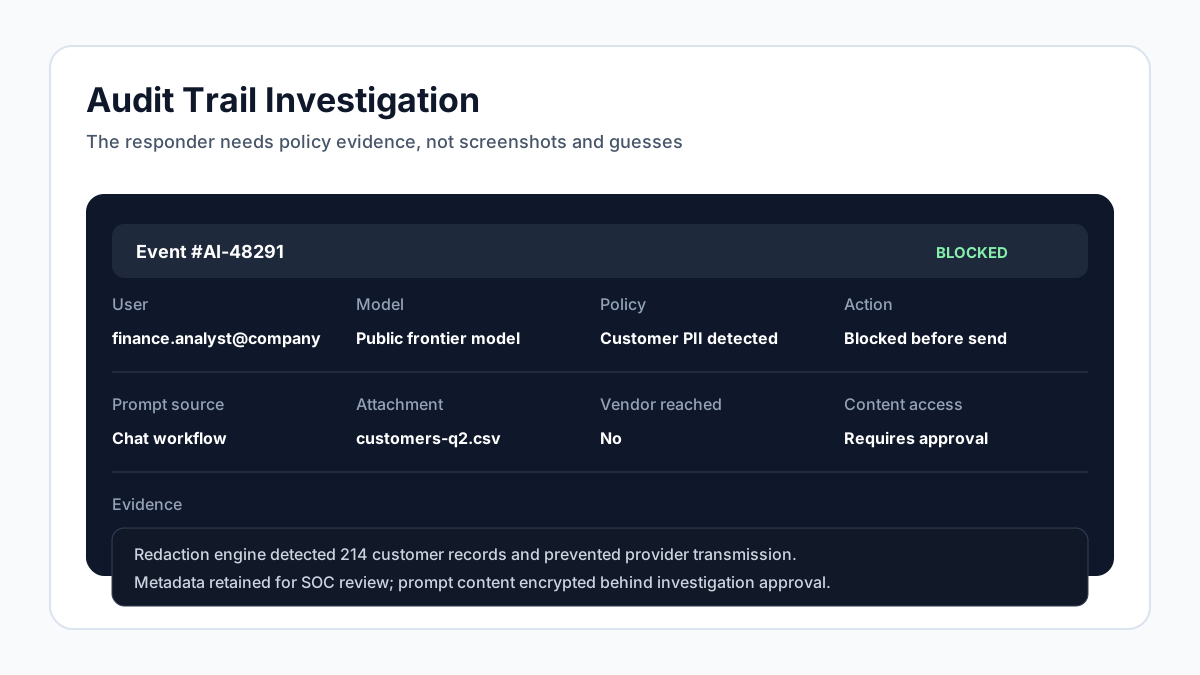
The first response step is evidence preservation. Analysts need a reliable record of the user, time, source application, prompt, attachments, selected model, vendor endpoint, policies that triggered, redactions applied, response, and any downstream export. If the organization only has network logs, the investigation will be vague. If the organization has AI-native audit trails, the analyst can reconstruct the event precisely and decide whether the sensitive content actually left the environment.
Evidence preservation does not mean every analyst should read every prompt by default. Mature programs separate metadata from content. Metadata can show that a user attempted to send a confidential spreadsheet to an unapproved model and that a policy blocked the request. Content access should be limited to investigation roles and, for highly sensitive events, require legal or privacy approval. The key is to avoid destroying or overwriting the record while the team is still determining scope. Deleting chat history inside the user interface may make the user feel safer, but it can make the organization less able to prove what happened.
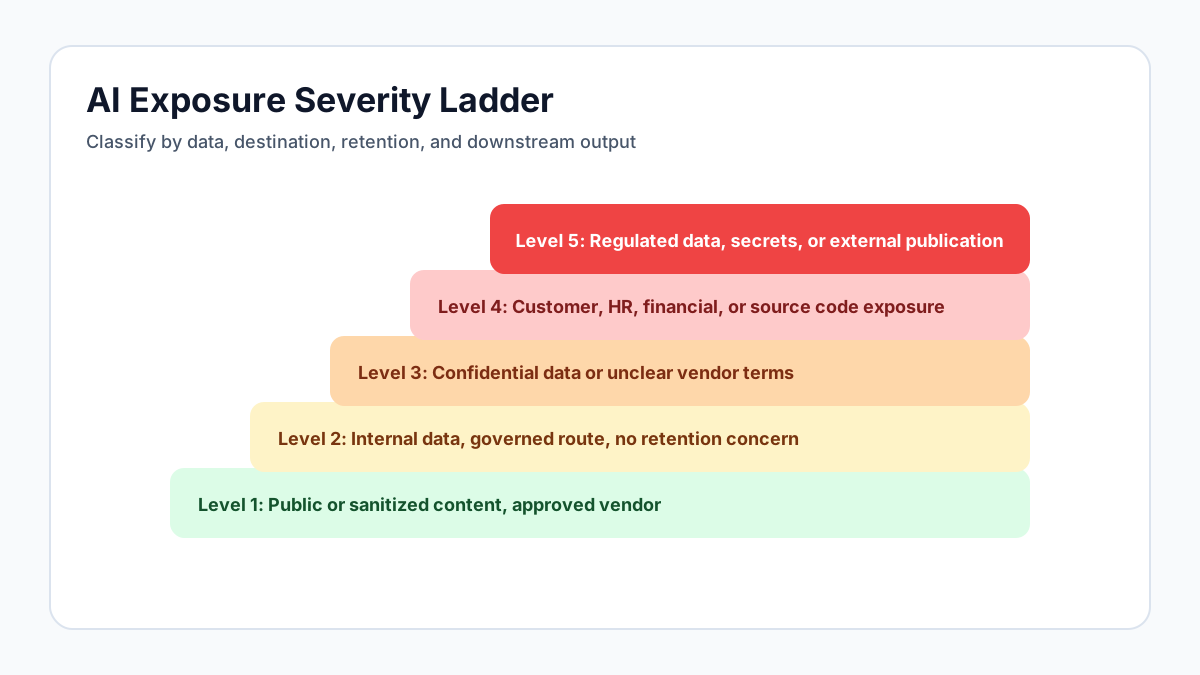
Triage the Data, Destination, and Retention
AI incident triage should answer three questions quickly: what data entered the workflow, where it went, and what retention applies. Data classification matters because the same action may have very different consequences depending on the content. A product roadmap draft, a small code snippet, a customer list, a payroll file, an access token, and a medical note all call for different owners and notification paths.
The destination matters because approved and unapproved systems carry different risk. If the prompt was routed through a sanctioned enterprise AI gateway with no vendor training, short retention, and inline redaction, the event may be contained. If the user pasted the same data into a personal account on an unapproved public tool, the team needs to review the vendor's terms, account settings, history deletion options, and contractual relationship. Retention matters because it determines whether the organization can request deletion, disable review, rotate exposed secrets, or prove that blocked data never reached the provider. Triage should produce a written scope statement: the data involved, systems touched, users affected, current containment status, and unresolved questions.
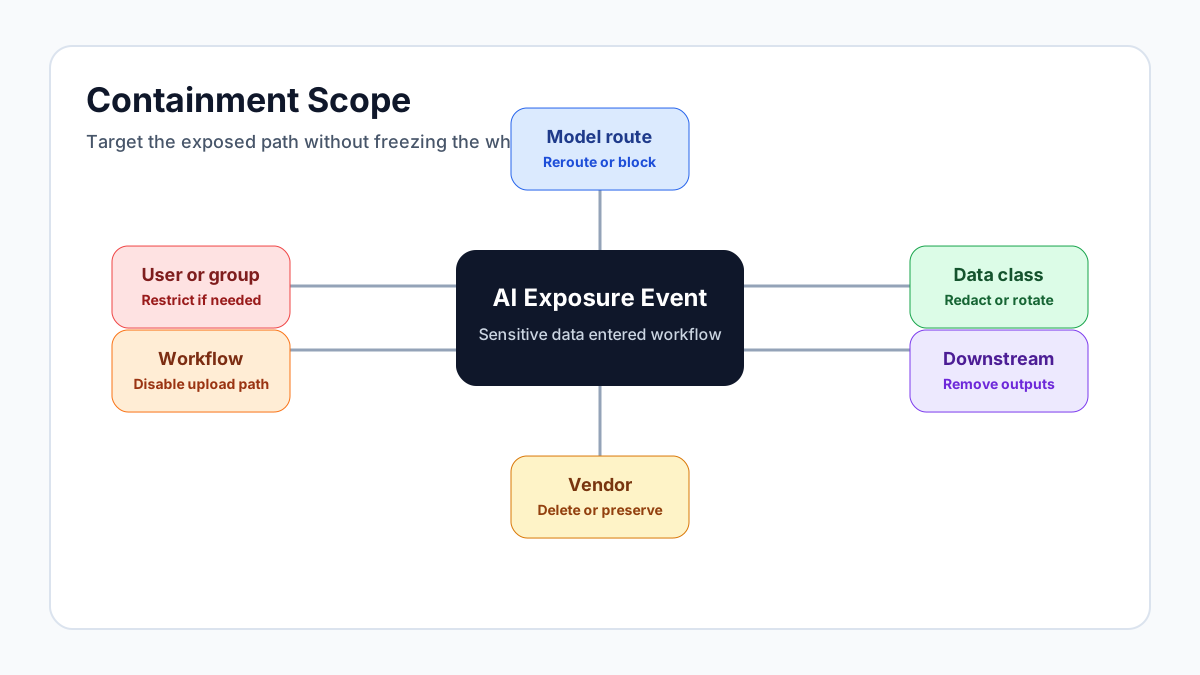
Contain the Exposure Without Freezing the Business
Containment should be specific. A common mistake is responding to one AI exposure event by blocking every AI tool for every user. That may look decisive, but it usually drives employees toward shadow AI and reduces visibility. Better containment starts with the affected user, workflow, model, data class, and tool. Temporarily restrict the user or group if repeated risky behavior is involved. Block the specific vendor or integration if it lacks required controls. Disable file uploads for a department if the incident came from bulk exports. Rotate credentials if secrets were exposed. Remove downstream AI-generated content if it was published into customer-facing systems.
Containment should also preserve the useful path. If employees were trying to solve a legitimate business problem, give them a safer alternative immediately. A support team that pasted customer tickets into an unapproved model may need a sanctioned ticket summary workflow. An engineer who shared code may need a governed coding assistant with repository boundaries. A finance analyst who uploaded a spreadsheet may need a secure document analysis workflow. Incident response is most effective when it fixes the risky route and replaces it with a governed route the business can actually use.
Decide Who Must Be Involved
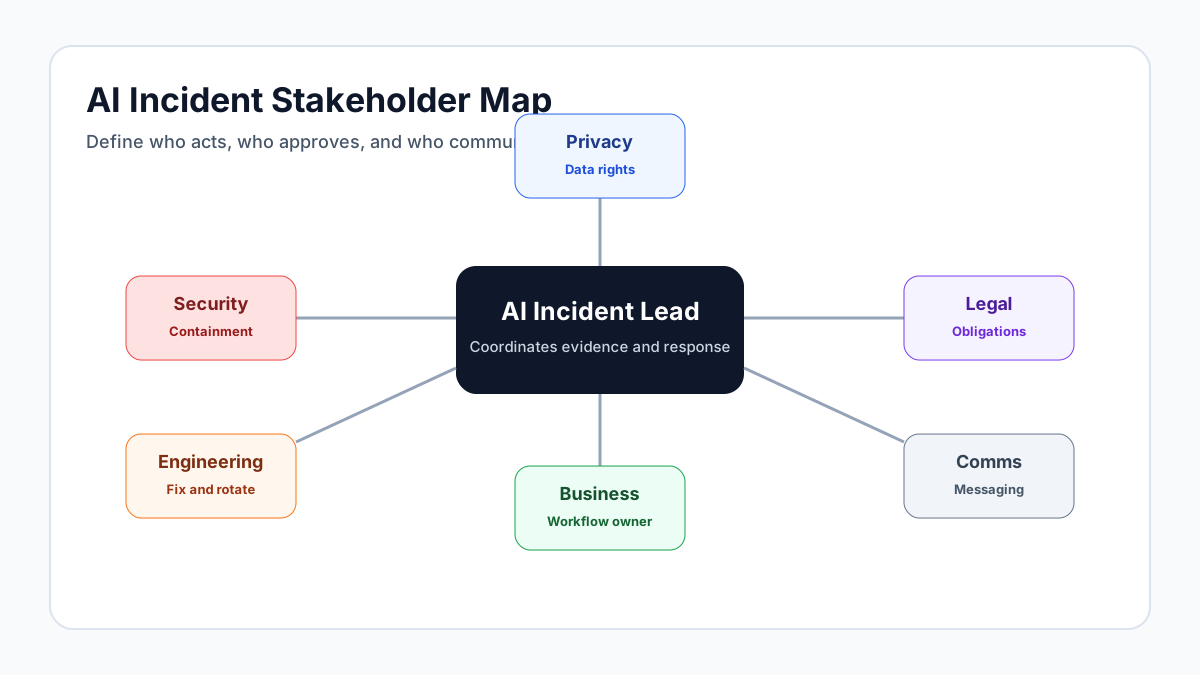
AI incidents cross organizational lines quickly. Security owns triage and containment, but legal, privacy, compliance, HR, engineering, customer support, procurement, and communications may all need to participate depending on the data and impact. A prompt containing employee performance notes should include HR and privacy. A prompt containing source code and secrets should include engineering and platform security. A prompt containing customer contractual data should include legal, customer success, and possibly account leadership. A prompt used in a regulated decision workflow may require compliance review even if no external disclosure occurred.
The incident plan should define escalation triggers before the first serious event. Examples include regulated personal data, credentials or secrets, customer-controlled confidential data, merger or financial information, data subject rights implications, high-risk AI system output, repeated user violations, and any event involving an unapproved vendor with unclear retention. The plan should also define who can approve access to prompt content during the investigation. Without a pre-approved escalation matrix, teams lose time debating process while evidence ages and affected systems continue operating.
Close the Loop with Control Improvements
An AI incident is rarely just a user mistake. It usually reveals a missing control, an unclear policy, a poor workflow, an approval gap, or a training failure. The post-incident review should identify why the user chose that tool, why the sensitive data was available in that form, why the policy did or did not trigger, and whether a safer workflow existed. If the user had no approved way to complete the task, the root cause is not only behavior; it is design.
Control improvements should be concrete. Add a redaction rule for the data class that was exposed. Update policy guardrails to warn users before upload rather than after submission. Move a popular unapproved use case into a preset workflow. Restrict a model tier to trained users. Improve the AI tool catalog. Add a department-level budget or approval step for high-volume workflows. Update vendor records if retention or subprocessors created uncertainty. The best incident response programs turn each event into better routing, better defaults, and better evidence for the next review.
Run Tabletop Exercises Before the Real Event
AI incidents are new enough that many teams discover process gaps only during a live event. Tabletop exercises reduce that risk. Pick realistic scenarios: a sales analyst uploads a customer export to a public chatbot, an engineer pastes source code with an embedded secret into a coding assistant, a support agent sends regulated customer notes into an unapproved summarizer, or an autonomous workflow emails an AI-generated answer to the wrong audience. Walk through detection, evidence access, containment, stakeholder notification, vendor questions, and final remediation.
The exercise should expose decisions that need to be made before pressure arrives. Who can approve prompt content review? Who contacts the vendor? Which systems need credential rotation? Which customer commitments affect notification? Which workflows have approved alternatives? Which logs prove the data was blocked or redacted? Which policy owner can change a guardrail in production? The output should be a revised runbook, not a slide deck. Each tabletop should produce concrete improvements: an updated escalation matrix, a new redaction rule, a cleaner evidence export, a vendor contact path, or a safer workflow for the business need that caused the simulated event.
The exercise should also test communication. Employees need clear instructions about what to stop doing, what safer workflow to use, and whether any customer-facing content must be paused. Leadership needs a concise impact statement that separates confirmed facts from assumptions. The legal team needs enough evidence to assess obligations without slowing urgent containment. Practicing those handoffs matters as much as practicing the technical response. A small communications failure can turn a contained technical issue into a confidence problem across customers, executives, and employees. It also keeps remediation ownership clear after the urgent response ends.
Where Remova Fits
Remova gives incident teams the controls they need before the event happens. Inline sensitive data protection can redact or block protected content before it reaches a model. Audit trails capture who used which workflow, which model was selected, which policy triggered, and what action was taken. Role-based access limits risky capabilities to the teams trained and approved to use them. Usage analytics helps identify departments or workflows where warnings cluster before a major event occurs.
This changes the posture from reactive cleanup to governed response. When an alert fires, analysts do not start from rumors or screenshots. They start from structured evidence, known policy behavior, and a clear record of whether data was allowed, blocked, redacted, or routed to a safer model. That is the difference between telling leadership "we think nothing serious happened" and showing them exactly what happened.